Archive

Archive for March, 2009

How familiar are you with code profiling?

March 30th, 2009
Comments Off

SamplingProfiler was initially released in the Delphi ASM newsgroup, and I’m curious about the audience of this website, so I’ve setup a small poll.

How familiar are you with code profiling and/or Delphi code optimization? Can you tell apart instrumenting and sampling profilers merely by their respective heisenbugs, or is that profiler business sounding like a TV series from the last century?
Poll - Familiarity with Profilers

News , , , , , ,

SamplingProfiler 1.6.1 released

March 26th, 2009

Still hot out of the D2009 linker is v1.6.1 of SamplingProfiler.
This is essentially a bugfix release which should solve the Win2k compatibility issue.

Changes since from 1.6.0 to 1.6.1:

  • Supports rough profiling when MAP file does not hold detailed information.
  • Fixed a transient case in which irrelevant samples could be collected.
  • Fixed a dll reference that caused issues on Win2k.
  • Minor UI fixes and changes.

You can grab it from its changelog page.

News , , , ,

begin…end as bottlenecks?

March 25th, 2009

There will come a time when SamplingProfiler may report you that begin or end are your bottlenecks. This may sound a little surprising, but it’s actually quite a common occurrence, and something that instrumenting profilers are not going to point out, so it might be worth a little explanation.

This can be illustrated it with the minimalistic example of an array property getter. Witness the innocuous looking code below:

function TMyList.GetItem(index : Integer) : T;
begin
    if (index < 0) or (index >= Count) then
       Error(index);
    Result := FItems[index];
 end;

Nothing out of the ordinary there, you can find similar looking code in practically every array-based collection in the RTL and many third party libraries. But someday, that GetItem will be bottleneck, and you could be left looking at code profiling results like those:

begin-end-critical-01

Yes, those are the are the begin and end lines taking up more than 70% of the CPU time spent inside GetItem
You knew it! Sampling profilers are unreliable… or are they? Surely the index range checking must be the culprit? or the assignment and the reference counting business? Well, they could be, but in this case they aren’t.

To understand why, let’s have a look in the CPU view. Place a breakpoint on your begin, run up to there and hit Ctr+Alt+C, here is what you could see:

begin-end-critical-02

That’s a whole lot of traffic to the stack: 3 registers saved, 3 copies. Those things aren’t free, they can dwarf what your explicit code does, and in this example, they do. We didn’t even have any local variables, if we did, they would have taken setup and teardown code, and this code would have been “hidden” in begin and end too.

This illustrates a difference of sampling vs instrumenting profilers: the ability to pinpoint an actual bottleneck, even if it is “outside” of your explicit code, so you can find where the actual bottleneck is, and don’t waste time trying to optimize what isn’t critical.

Now what can you do to improve things locally? With generics, an interface type and Delphi 2009 sp2, nothing much, short of going BASM. The bottleneck code is compiler-generated, optimizing the assignment or the range checking would only provide minimal benefits. If you want to go faster, you’ll have to reduce the number of calls to GetItem, ie. open that “Show Callers” pane, have a look there, and solve the issue at the higher-level routines that are involved.

But there are other situations in which you can influence the auto-generated begin/end code, the solutions then typically revolve around distributing the code across smaller local functions or methods, tweaking your variable usage, separating branches, or if all else fails, going BASM… but that is food for future posts!

Tips , , , , , , ,

SamplingProfiler 1.6.0 out of the woods

March 20th, 2009

Version 1.6.0 of the Delphi sampling profiler is now available from its downloads page!

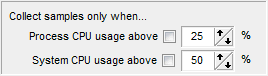
cpu-usage-optionsThe main addition is the ability to have sampling conditioned by CPU usage, ie. only gather profiling information when the CPU usage is high, either for the system or the process.
This was added with three goals in mind:

  • eliminate all that happens when the CPU isn’t busy from the profiling results, making it easier to focus on the CPU bottlenecks that matter.
  • gather profiling information only when the system is under stress, and find out if your code copes well with system stress… or is a poor OS citizen and just adds to the trouble.
  • identify sources of high CPU usage in your code, that could be reducing battery life when running on a mobile platform.

Note that CPU-usage based sampling can have the side-effect of eliminating I/O and other waits from the profiling results, so if your application’s bottlenecks aren’t CPU-based, you could miss them.

Other changes are support for the “Pause” key to pause profiling, time limit for sampling collection now starting from the first time sampling is enabled (rather than application start) and support for multi-selection when opening results.

This is also the first SamplingProfiler version compiled with Delphi 2009, oddities are not known at this point but expected. For all bug reports & suggestions, head to the forums.

News , , , , , ,

Website getting up to speed

March 17th, 2009
Comments Off

I’ve reorganized the site a bit since the relocation, tweaked WordPress behind the scenes, added OpenID support for comments and hopefully sorted out the over-aggressive spam filter.

The support forums are now also hosted here, no OpenID support for them just yet, but I’ll enable it as soon as it’s out of beta. For bug reports and features/suggestions, the forums are the place to post (easier to track things).

There will likely be a new SamplingProfiler release in the next days, which will add support for CPU-usage-based sampling, ie. profiling only takes place when the CPU usage goes above above a treshold (either at the system or the process level).

News , , , , ,

MapFileStats public release

March 12th, 2009

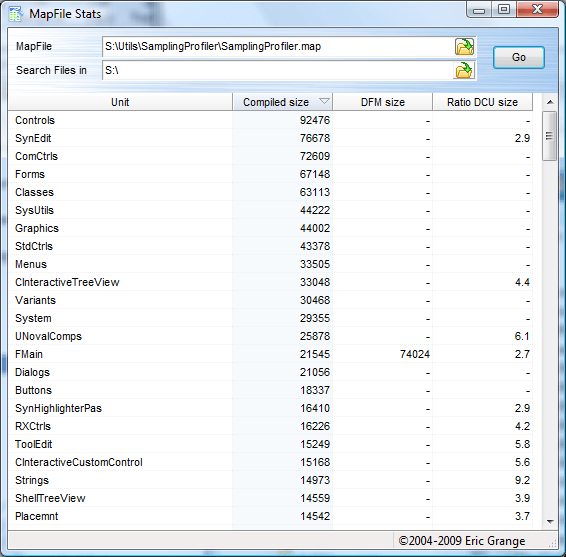
mapfilestatsMapFileStats is a simple free utility to obtain executable binary size statistics derived from a “.map” file.

Use it to know which units contribute the most to an executable’s size, which DFMs are the largest, which units you have dependencies on but barely use in your executable, or merely to know exactly what gets into your executable.

You can integrate it into the Delphi IDE via the Tools menu, see the MapFileStats page for more details or to the download page and see for yourself!

News , , , , , , ,

Saving results & merging

March 9th, 2009
Comments Off

SamplingProfiler run results can be saved to .spr files (Sampling Profiler Results) and later reused for comparison purposes, or for merging, one of the less obvious features of the profiler.
You can merge results by right-clicking on a results tab and selecting… “Merge results”, oddly enough. After this, the samples will be aggregated across the runs you selected, hopefully providing more statistical accuracy.

This can be particularly useful when analysing the results from multiple runs, collected from multiple users in the field via SamplingProfiler’s silent mode for instance. It can also be useful if you collect profiling information from automated test tools, each stressing the same library or base code in different ways.

Merging results isn’t as much about getting high numerical precision on your bottlenecks. Sure, you can use it for numerical accuracy, but who cares if a routine takes 95% or 92.24638% of the CPU time? identifying the bottleneck is usually all that matters.

Merging is about figuring out the bottlenecks that matter in everyday use, bottlenecks which may not come up in your routine tests, or may not be seen as critical when seen in isolation. It can be about getting information on that odd, hard-to-reproduce, slowdown your users may be experiencing from time to time. It can also be about identifying the minor bottlenecks that could be the cause of a “sluggish” feel to your UI.

A last word on the SPR files: those are persistence streams of SamplingProfiler native format, they’re binary, highly compact, and for you, the user, highly proprietary and blackboxy. If you want to do your own analysis on the profiling results, there is an alternative: you can save results as an XML file, which will include all the data in a verbose fashion. Be warned however that a deceptively small SPR can result in a huge XML file.

Tips , , , , , ,

Host downtime and relocation

March 5th, 2009
Comments Off

Previous host experienced downtime issues, so DelphiTools.info has been relocated on a new host. Not everything is back up in order just yet…

Update: download, screenshots & links back online, but comments seem to be lost forever…
Update 2: did some tweaking with the help of YSlow, site should be loading faster now.
Update 3: was able to access the old database, restored the lost comment.

News ,

Peer support forum

March 3rd, 2009
Comments Off

I’ve opened a forum for SamplingProfiler, destined for peer support and bug reports:

http://delphitools.info/forums/

I don’t have any previous experience with freeforums.org as a host, but I don’t expect the traffic to be huge, so it’ll probably be good enough.
Forums are now hosted locally.
Another channel through which you can reach me would be via posting in the CodeGear newsgroups.

News , , , ,

Control sampling from your code

March 2nd, 2009
Comments Off

One issue when trying to profile a “live” application is that you may be getting a lot of noise, resulting from a particular library or section of code being executed from multiple contexts. You may also be after profiling only one particular case, and want some reproducibility between runs… in short: you want a finer grained control on when or for what the profiling will take place.

In those cases, you can control SamplingProfiler’s samples collection from your code with the following:

OutputDebugString('SAMPLING ON');
 ...whatever needs to be profiled...
 OutputDebugString('SAMPLING OFF');

Those calls to OutputDebugString() are understood as commands to turn sampling ON or OFF. Usually you’ll want to use this in conjunction with the “Start sampling on command only” option, but it can also be used in reverse to “pause” sample collection. OutputDebugString() is declared in the Windows.pas unit.

As of version 1.5.2, another command that is accepted via OutputDebugString() is ‘SAMPLING THREAD threadID’, which is used to define from which threadID samples must be collected. This is useful when you want to profile a particular thread in multi-threaded application… but that’s another can o’worms for another day!

Tips , , , , ,